
Staying connected while traveling through Haneda Airport just got easier. The Unlimited WiFi Router rental service provides a convenient way for passengers to access high-speed internet on the go. With a simple pickup process and support for up to 10 devices, this router can be an invaluable tool for business travelers and travelers alike. While there are some usage limitations, the service’s accessibility and flexibility make it an attractive option for those who need to remain connected during their time in Tokyo.
Key Points


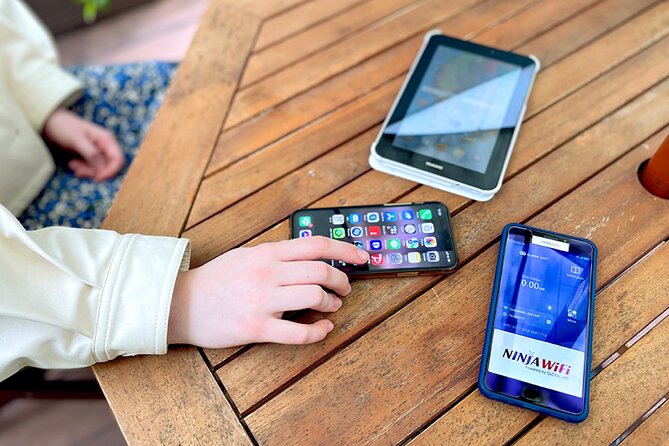





- Unlimited 4G LTE WiFi router available for rental at Haneda Airport for up to 90 days, connecting up to 10 devices simultaneously.
- Pickup location is the NINIJA Wi-Fi counter in the arrival terminal, open from 6:45 AM to 11:45 PM, with wheelchair-accessible options.
- Package includes the router, USB cable, adapter, WiFi pouch, and a free power bank.
- Daily high-speed data cap of 3GB, with continued internet access at reduced speeds after the cap.
- Mixed reviews on customer service and language barriers, with some issues regarding incorrect drop-off directions.
Overview and Features
The article provides an overview of an unlimited 4G LTE WiFi router available for pickup at Haneda Airport in Tokyo.
This router connects up to 10 devices simultaneously and is available for rental durations of up to 90 days. It includes the WiFi router, a USB cable, an adapter, a WiFi pouch, and a free power bank.
Customers can conveniently pick up the device outside of airport security at the NINIJA Wi-Fi counter in the arrival terminal, which is open from 6:45 AM to 11:45 PM.
However, high-speed data is limited to 3GB per day, and refunds aren’t provided for non-collection.
You can also read our reviews of more tours and experiences in Tokyo.


Pickup Details
Where can customers pick up the unlimited WiFi router at Haneda Airport?
The pickup location is the NINIJA Wi-Fi counter in the arrival terminal.
Pickup hours are from 6:45 AM to 11:45 PM.
Customers must collect the device outside of airport security.
The router, USB cable, adapter, WiFi pouch, and free power bank are all included in the rental package.
Wheelchair users can access the pickup and return counters, and the surfaces are wheelchair-friendly.
The pickup area is close to public transportation options.
Usage and Limitations
Although the unlimited 4G LTE WiFi router available at Haneda Airport allows users to connect up to 10 devices simultaneously, the high-speed data is limited to 3GB per day.
This daily data cap ensures the network remains reliable and accessible for all customers. After the 3GB limit is reached, users will still have access to the internet, but at reduced speeds.
It’s important to note that refunds aren’t provided for non-collection of the router, so customers should plan their travel and pickup accordingly.
These usage limitations ensure a seamless connectivity experience for all.
Accessibility and Transportation
Wheelchair-accessible pickup and return counters make the unlimited 4G LTE WiFi router service at Haneda Airport convenient for all travelers.
The counters are located close to public transportation, ensuring easy access. The surfaces throughout the pickup and drop-off areas are wheelchair-friendly, allowing for smooth mobility.
Travelers can collect and return the device outside the airport security, making the process hassle-free.
With its accessibility features and proximity to transport options, the WiFi router rental service at Haneda Airport caters to the needs of a diverse range of travelers, including those with mobility requirements.
Reviews and Feedback
The unlimited 4G LTE WiFi router at Haneda Airport has received a mixed bag of reviews from users. Based on 19 reviews, it has an overall rating of 3.8 out of 5. Positive comments praised the easy pickup process and reliable connectivity, while some users reported issues with customer service and incorrect map directions for drop-off. There were also mixed experiences regarding language barriers with the staff.
| Positive Reviews | Negative Reviews |
|---|---|
| Easy pickup | Poor customer service |
| Reliable connectivity | Incorrect drop-off directions |
| Language barriers |
- Teamlab Planets Tokyo: Digital Art Museum Entrance Ticket
★ 4.6 · 9,779 reviews - Tokyo: Sumo Show Experience With Chicken Hot Pot and a Photo
★ 4.8 · 6,678 reviews - Tokyo: Mt. Fuji, Hakone, Lake Ashi Cruise and Bullet Train
★ 4.4 · 5,024 reviews - From Tokyo: Mt. Fuji Full-Day Sightseeing Trip
★ 4.5 · 4,970 reviews - Tokyo: Hop-On Hop-Off Sightseeing Bus Ticket
★ 3.9 · 4,207 reviews - Tokyo Tower: Admission Ticket
★ 4.6 · 3,661 reviews
Rental Process
Renting the unlimited 4G LTE WiFi router at Haneda Airport is a straightforward process.
Visitors can pick up the device at the NINIJA Wi-Fi counter in the arrival terminal, open from 6:45 AM to 11:45 PM.
The router can connect up to 10 devices simultaneously and is available for rentals up to 90 days.
Customers must collect the device outside of airport security.
While high-speed data is limited to 3GB per day, the rental includes a USB cable, adapter, WiFi pouch, and a free power bank.
Note that refunds aren’t provided for non-collection of the router.
Customer Support
While reviews on the customer service experience have been mixed, some users have reported issues with language barriers when communicating with the staff at the NINIJA Wi-Fi counter.
| Issue | Staff Feedback |
|---|---|
| Incorrect drop-off directions | "We’ve passed the feedback to our team and will improve the map for future users." |
| WiFi router not working | "We’ll be happy to replace the device or provide a refund if you’re unsatisfied." |
| Questions about data limits | "The 3GB daily cap is clearly stated in the rental agreement, but we can explain it further." |
| Difficulties with returns | "Our staff receive language training, but some may still struggle with English. Please be patient with us." |
Frequently Asked Questions
What’re the most frequently asked questions about the Unlimited WiFi Router at Haneda Airport?
Customers often wonder about the device’s data limits, as it provides 3GB of high-speed access per day.
They also inquire about the pickup and return process, which takes place at the NINIJA Wi-Fi counter in the arrival terminal from 6:45 AM to 11:45 PM.
Refunds aren’t given for non-collection, and the router must be picked up outside of airport security.
The service is wheelchair accessible, and close to public transport.
Since You Asked
Can the Wifi Router Be Used Outside of Tokyo?
The WiFi router can be used outside of Tokyo, but its high-speed data is limited to 3GB per day. Customers should be aware of these usage limitations when traveling beyond the immediate Haneda Airport area.
Is There a Deposit or Security Fee Required?
The WiFi router rental doesn’t require a deposit or security fee. It’s a straightforward rental service that provides unlimited high-speed internet access during your stay in Japan, with the option to pick up the device at Haneda Airport in Tokyo.
Can the Router Be Returned at a Different Location?
The router can’t be returned at a different location. It must be returned to the NINIJA Wi-Fi counter in the Haneda Airport arrival terminal during the specified 6:45 AM to 11:45 PM pickup hours. There’s no option for alternate drop-off locations.
Is There Technical Support Available During the Rental Period?
There’s no mention of technical support being available during the rental period. The information provided focuses on the router’s features, pickup/return process, and usage limitations. Users would likely need to contact the provider directly for any technical assistance needed.
How Does the Payment Process Work for the Rental?
The payment process works as a rental – customers pay upfront for the duration they need the router. There’s no deposit, but refunds aren’t provided if the router isn’t collected. Payments can be made at the pickup counter.
Unlimited WiFi Router – Haneda Airport (Tokyo) Pickup
The Sum Up
The Unlimited WiFi Router from NINIJA at Haneda Airport is a convenient option for staying connected during your travels. It supports up to 10 devices and offers high-speed data, with continued connectivity even after reaching the daily cap. Easily pick it up on arrival, and enjoy hassle-free internet access throughout your stay in Tokyo.


